

Google Business Profile optimization is the work of making your listing complete, accurate, and easy for Google to match with local searches. When someone nearby searches for a plumber, a roofer, or a pressure washing company, Google shows a short list of businesses in the map pack. A well-managed profile gives you a fair chance to appear there, and it gives customers the details they need to call, visit, or book. This guide walks through each step in plain language, so you can improve your listing without guessing.
Before you change anything, it helps to see where your listing stands today. A quick Google Business Profile audit can help you spot gaps, from missing categories to outdated hours. Then use the steps below to fix those gaps in a sensible order. You do not need special tools or a large budget. You need accurate information, steady habits, and a little patience.
What Google Business Profile Optimization Means
Optimization does not mean tricking Google. It means giving Google clear, truthful information so it can match your business to the right searches. According to Google’s own page on how Google determines local ranking, local results are based mainly on three factors:
- Relevance: how well your profile matches what someone is searching for
- Distance: how far your business is from the person searching
- Prominence: how well known your business is, including reviews and information found across the web
Google also states that there is no way to request or pay for a better local ranking. That makes the plan simple. Complete your profile, keep it accurate, and earn real reviews.
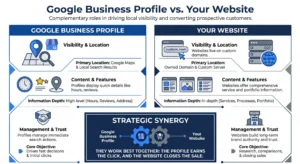
Google Business Profile vs Your Website
Many owners wonder whether they need both. Here is the difference between the two.
Google Business Profile
- Appears in Google Maps and local search results
- Shows your hours, address, photos, reviews, and contact buttons
- Is managed inside your Google account
- Works best for quick decisions, like which business to call
Your website
- Lives on your own domain, and you control the design
- Has room for detail about services, process, and past work
- Builds trust and turns visitors into customers
- Works best for people who want to compare options before they act
They work best together. The profile earns the click, and the website closes the sale.
Step-by-Step Checklist
Step 1: Claim and Verify Your Profile
Search for your business name on Google and claim your listing. If none exists, create one. Then complete verification. Google advises verifying your business so your locations are more likely to appear in local results. Make sure you manage only one profile for each business, since duplicates can confuse both customers and Google.
Step 2: Use Your Real Business Name
Use the name that appears on your sign, invoices, and website. Google’s guidelines for representing your business say that unnecessary extra information in the name is not allowed and could lead to a suspended profile. Avoid adding keywords, slogans or city names that are not part of your real name. It is tempting, but it creates risk without a clear benefit.
Step 3: Choose the Right Categories
Your primary category is one of the most important choices you will make. Pick the one that best describes your main service, and be as specific as possible. Then add secondary categories only if they truly describe what you do. A roofing company, for example, should not add categories for services it does not offer.
Step 4: Add Your Address, Service Area and Hours
Enter your full address if customers visit your location. Add accurate hours, including holiday hours and any special schedules. If you travel to customers instead, set up a service area and list the places you serve.
Service area businesses, such as roofers, cleaners, and pressure washing crews, face this choice every day. We built a pressure washing company website for exactly this type of business, and the same clear service area wording belongs on the profile too.
Step 5: Write a Clear Description
Describe what you do, who you serve, and where. Use plain language, and write the way a customer would speak. Stick to facts, and read Google’s content rules before you publish. Avoid filler such as “best in town” unless you can support it.
Step 6: List Your Services and Products
Add each service with a short description. Use the words customers actually search for. For example, write “gutter cleaning” instead of a vague phrase like “exterior maintenance.” Complete service lists give Google more information to match your profile with relevant searches.
Step 7: Upload Real Photos
Photos help people decide before they ever call. Add pictures of your team, your vehicles, your storefront, and your finished work. Use real images instead of stock photos, and add new ones on a regular schedule. Showing real work builds trust on your profile and on your website. Our local service business projects show how we present real work online.
Step 8: Earn and Answer Reviews
Google says review count and review score factor into local ranking. So, ask happy customers to leave an honest review soon after the job is finished. Make it easy by sharing a direct link in a text or email.
Never buy reviews, offer rewards that break the rules or write reviews for your own business. Read Google’s Business Profile policies before you launch any review process.
When you reply to reviews, keep these points in mind:
- Thank the customer by name when possible
- Mention the service you provided in a natural way
- Stay calm and polite with negative reviews
- Offer to solve the problem offline
- Reply to every review, not only the positive ones
Step 9: Share Updates
Use posts to share recent projects, seasonal reminders, and changes to your hours. Updates show that your business is active. Keep your information current whenever something changes, because an outdated phone number or closed hours can cost you a customer.
Step 10: Connect a Fast Website
Your profile links to your website, so the website must be ready for visitors. It should load quickly, work well on phones, and make your phone number easy to find. A fast, mobile friendly website turns a profile visit into a real inquiry. Create clear pages for each main service and each area you serve, and make sure the details match your profile.
Step 11: Keep Your Information Consistent
Your business name, address, and phone number should match everywhere. That includes your website, social pages, and online directories. Google notes that prominence also comes from information across the web, such as links, articles, and directories. Consistent details help Google trust your business.
If you want help turning these basics into steady leads, our SEO and lead generation services can support the work beyond the profile.
Step 12: Review Your Profile Every Month
Set a calendar reminder and run through this short list:
- Check your hours, phone number, and address
- Add at least one new photo
- Reply to any new reviews
- Remove services you no longer offer
- Compare your information with your website
Storefront vs Service Area Businesses
The right setup depends on how you meet customers. Here is the difference.
Storefront business
- Customers visit your location
- Show your full address and opening hours
- Photos of the location and inside space help people find you
Service area business
- You travel to customers at their location
- List the areas you serve instead of showing a customer-facing address, where it fits your situation
- Photos of your team, vehicles, and finished jobs matter most
Some businesses do both. In that case, follow Google’s guidelines carefully so your profile reflects how you really operate.
Common Mistakes to Avoid
Many profiles lose ground because of simple errors:
- Stuffing keywords into the business name
- Choosing too many or irrelevant categories
- Leaving hours outdated, especially around holidays
- Using stock photos instead of real work
- Ignoring reviews, or replying only to praise
- Creating duplicate profiles for the same business
- Using a different phone number on the profile than on the website
Fixing even two or three of these can improve how customers and Google see your business.
How Long Does It Take to See Results?
It depends. Some changes, such as corrected hours and new photos, can appear quickly. Visibility, however, usually improves over weeks or months, and results depend on competition and location. Be careful with anyone who promises a first-place ranking, because Google does not allow anyone to buy one.
Frequently Asked Questions
Q: What is Google Business Profile optimization?
A: It means completing and improving your Google listing so it matches local searches. You add accurate details, choose the right categories, upload real photos, and earn reviews, which helps customers find and trust you.
Q: Can I pay Google to rank higher in the map pack?
A: No. Google states that you cannot request or pay for a better local ranking. You can improve your chances by verifying your profile, keeping details accurate, and collecting honest reviews from real customers.
Q: Should I use my business name or add keywords to it?
A: Use your real business name, the one on your sign and paperwork. Google guidelines say unnecessary extra words in the name are not allowed and can lead to a suspended profile, so always keep it accurate.
Q: How many reviews do I need to rank in local search?
A: Google does not set a magic number. Review count and rating do factor into local ranking, so aim for a steady flow of honest reviews, and reply to each one in a polite, helpful way that shows future customers you care.
Q: How often should I update my Google Business Profile?
A: Update it whenever something changes, such as hours, services, or contact details. Beyond that, check it monthly, add fresh photos, answer new reviews, and make sure everything still matches your website.
Final Thoughts
Strong Google Business Profile optimization comes down to a few habits: be accurate, be complete, show real work, and keep earning honest reviews. Start with the basics in this guide, check your profile every month, and make sure your website supports it. Small, steady improvements add up over time.
Have questions about working with a team? Read our common questions about working with us. If you would rather have experts review your listing, you can get help with your Google Business Profile and talk through your goals. Prefer to talk right now? Call us at +1 931 416 5131, and we will answer your questions.